
App Health
The App Health page reports the health of your operations, broken down by each Operation Category.
The “health” is a representation of your Operation’s configuration and their published status to Shopify. If an Operation fails to publish, or any of it’s configuration limits are exceeded, the health for the Operation Category will be “unhealthy”.
Reviewing app health
Section titled “Reviewing app health”Open the App Health page from the app navigation. Each Operation Category has a report with a health state, the most recent publishing attempt, its status, and the metrics measured for that category.
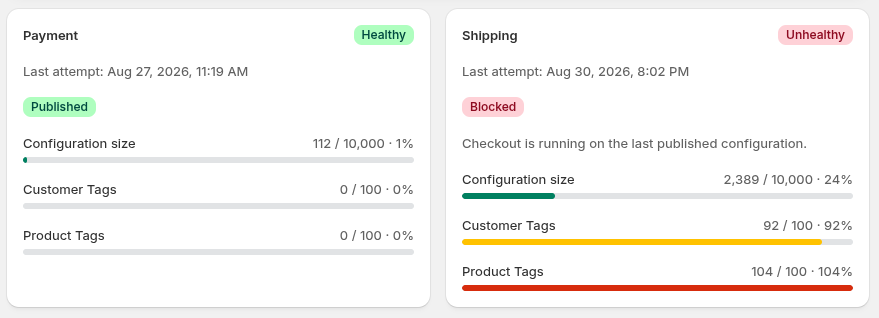
Metrics
Section titled “Metrics”Checkout Commander shows these metrics for each operation category:
- Configuration size: the size of the category’s checkout configuration, measured against 10,000 bytes.
- Customer Tags: the number of distinct customer-tag values used by conditions in enabled operations, measured against 100.
- Product Tags: the number of distinct product-tag values used by conditions in enabled operations, measured against 100.
Each metric shows its current value, limit, percentage, and health state.
Health states
Section titled “Health states”Each metric can be one of the following states:
- Healthy: below 90% of its limit.
- Warning: at 90% through 100% of its limit, including exactly 90% and exactly 100%.
- Unhealthy: above 100% of its limit.
The category’s state is the most serious state among its metrics. A category in Warning state still works and publishes successfully, though it’s worth being aware that the category is approaching a limit. An Unhealthy state blocks publishing changes for that category until the configuration is back within its limits.
Publish status
Section titled “Publish status”Health state and publish status answer different questions. State describes the latest measured configuration against Shopify’s limits. Status describes what happened on the most recent publishing attempt.
The available statuses are:
- Published: the latest configuration was accepted and published.
- Blocked: Checkout Commander stopped the publish because the measured configuration exceeded a Shopify limit.
- Publish failed: Checkout Commander tried to publish, but the publish failed for another reason. This is different from a limit-based Blocked status.
Blocked publishing
Section titled “Blocked publishing”When you save, enable, edit, or delete an operation, Checkout Commander publishes the Operations configuration with Shopify. If a metric is Unhealthy, publishing will be Blocked and the configuration changes will not take affect. Your changes remain saved in Checkout Commander, but they are not active at checkout. Checkout continues using the last published configuration.
Open App Health to find the Unhealthy metric. Simplify or remove configuration you no longer need, then save the change to start a new publishing. When the metrics are within their limits, the updated configuration will be published automatically.
If the status is Publish failed, follow Operation didn’t take effect and contact us with the visible failure message.
Email notifications
Section titled “Email notifications”Checkout Commander will send an email notification when App Health degrades. See Emails we send for details.