
Hide operation
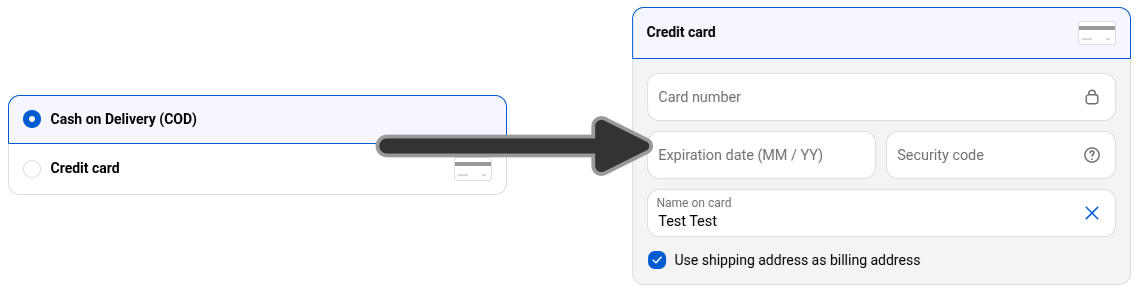
A Payment Method Hide operation changes which payment methods customers can see checkout. It simply changes the visibility of existing payment methods.
When to use it
Section titled “When to use it”Use a hide operation when you want to:
- hide certain payment methods based on destination location
- show certain payment methods based on customer tags
- hide certain payment methods based on cart value
The form
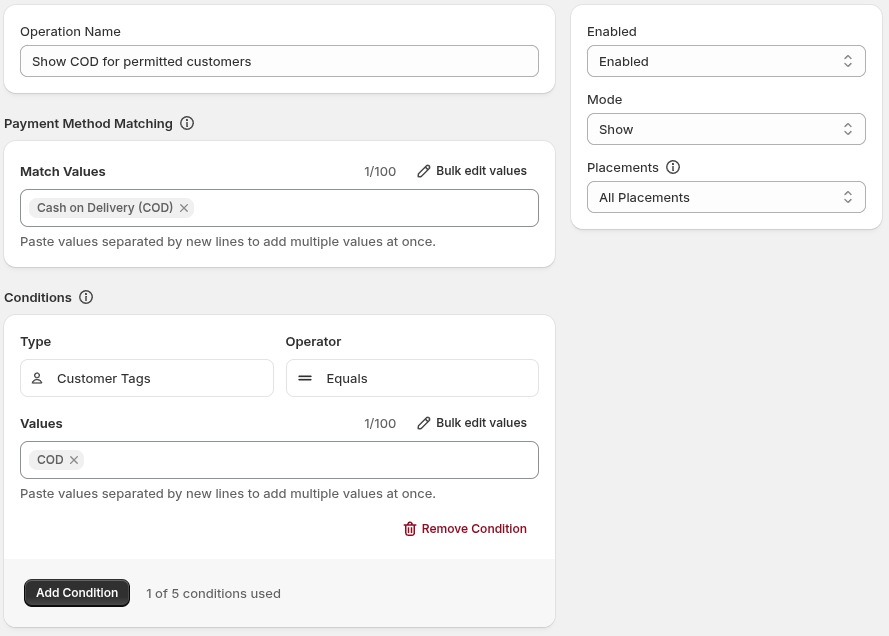
Section titled “The form”The operation form includes:
- Operation Name: identifies the operation in the app; customers do not see it.
- Enabled Status: controls whether the operation will execute. A disabled operation is saved but does will run.
- Mode: controls the mode the operation executes in. See Modes below.
- Payment Method Matching and Match Values: identify the payment methods to affect.
- Conditions: control when the operation applies.
Configuring a hide operation
Section titled “Configuring a hide operation”- Set the operation to Enabled Status.
- Enter an Operation Name for your reference.
- Choose a Mode.
- Under Payment Method Matching, add at least one Match Values entry using the payment method name shown in your checkout.
- Add Conditions if the operation should apply only in particular checkout situations.
- Select Save.
Hide operations have different “modes” they can operate in which changes their functionality.
Hide mode is the default and most sensible mode - it simply hides matched payment methods.
Show mode is the same as Hide mode, except it inverses the condition logic. When all conditions pass, matched payment methods are made visible rather than hiding them. When the conditions do not pass, matched payment methods are hidden.
The benefit to this mode is the condition logic can be written more succinctly with how we understand the problem being solved. Example: Offering “Charge on Delivery” for customers with the COD customer tag.
- With Hide mode, you write the condition as “Customer Tag does not equal COD”
- With Show mode, you write the condition as “Customer Tag equals COD” - we’re “showing” COD payment method when the Customer is permitted to
Payment Method Matching
Section titled “Payment Method Matching”Controls what payment methods will be hidden (or shown) in the checkout. Set Match Values to the exact payment method names to be hidden (or shown).
See also
Section titled “See also”- Conditions: build optional conditions and combine them with AND logic.
- Condition types: see the condition types available to payment operations.
- Operation didn’t take effect: troubleshoot publishing and matching.