
Building your first operation
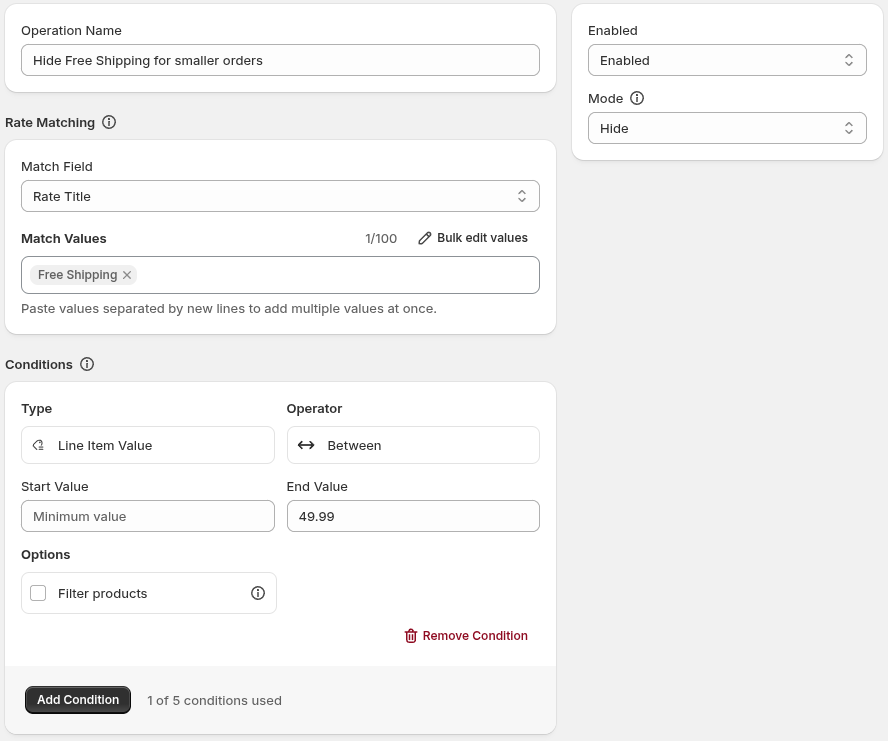
This tutorial creates an operation that hides an existing shipping rate named Free Shipping when the current delivery group’s line-item value is less than $50.
The rate must already exist and be available in the checkout you test. An operation can change an existing rate, but it cannot create a new one.
Create and configure the operation
Section titled “Create and configure the operation”- From the Home Page, click the Create Operation button
- Choose Shipping
- Choose Hide - you will be taken to the Shipping Rate Hide operation form
- In Operation Name, enter
Hide Free Shipping for smaller orders. - Leave Enabled status selected
- Leave Mode as the default Hide value
- Under Rate Matching, leave Match Field as Rate Title - this is will match by shipping rate name
- Under Match Values, enter
Free Shippinginto the text input, then click Add Value - Under Conditions, click Add Condition - a new condition will appear above
- Set Type to Line Item Value
- Set End Value to
49.99-Betweenoperators are inclusive matching - Click Save. Wait until the app reports Publishing complete! before testing the checkout
Save and publish
Section titled “Save and publish”After an operation is saved, there is a moment where the changes are published to your Shopify Checkout. You will see a “Publishing complete!” - you can now test your checkout for your new changes.
For more detail about conditions, see Conditions. For the operation model and active-operation allowance, see Operations.
Test the result
Section titled “Test the result”- Open a checkout where the existing Free Shipping rate is available
- Make the cart value in the less than $50 (using your shop’s currency)
- The Free Shipping should not be available to the customer
- Increase the cart value to $50 or more
- The Free Shipping should now be available to the customer
The operation should hide Free Shipping at $50 and below. If the current delivery group’s line-item value is higher than $50, the rate should remain available. If the rate is not available before the operation runs, there is nothing for the operation to hide.

If you’re not getting the expected result, follow Operation didn’t take effect. You can also contact us and we’ll be happy to help.