
Rename operation
A Payment Method Rename operation changes only the name shown for a matching payment method in your checkout.

When to use it
Section titled “When to use it”Use a rename operation when you want to:
- use a clearer name for a payment method, such as
Charge on Deliveryinstead ofCash on Delivery (COD) - show payment methods in the customer’s language
The form
Section titled “The form”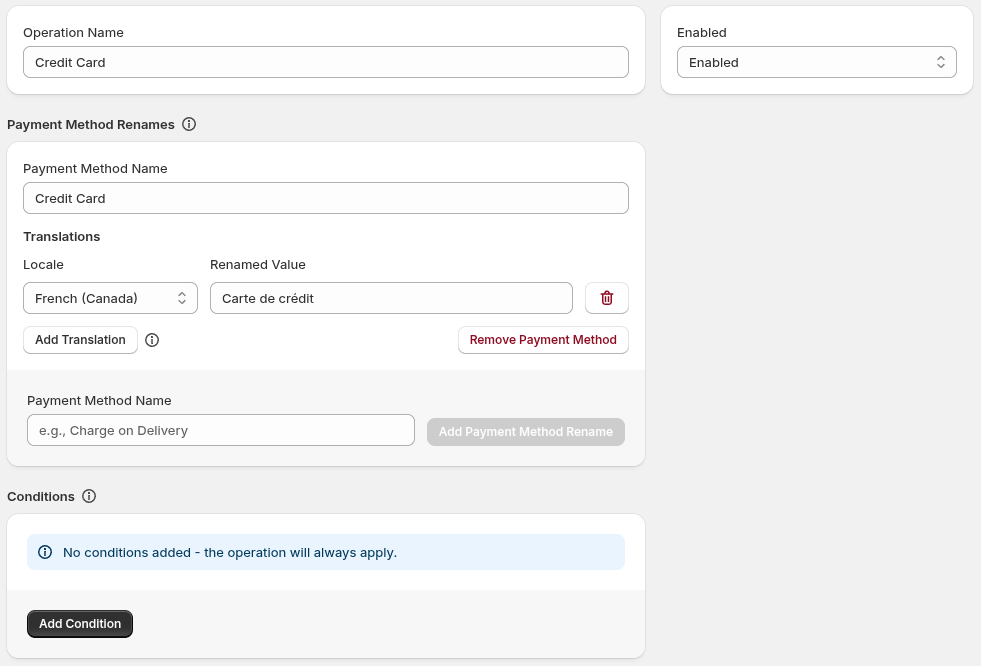
The operation form includes:
- Operation Name: identifies the operation in the app; customers do not see it.
- Enabled Status: controls whether the operation will execute. A disabled operation is saved but does will run.
- Payment Method Renames: this section controls payment methods to be renamed, and what values they’ll be renamed to.
- Conditions: control when the operation applies.
Renaming a payment method
Section titled “Renaming a payment method”Enter the payment method name you wish to rename into the Payment Method Name input and click the Add Payment Method Rename button. The payment method name will only match if it’s spelled exactly, including capitalization and spaces.
Adding a payment method here provides a Rename Value input to define it’s new name. If your plan supports it, you can enter renames or multiple languages.
Add translations
Section titled “Add translations”Click “Add Translation” to add multiple translations for the current payment method, entering the language specific rename value for supported locale. Checkout Commander does not translate automatically - you must enter the desired translations yourself.
Checkout first uses a translation matching the full customer locale, such as fr-CA, and then checks for a language-only translation, such as fr. If neither matches, the original payment method name remains unchanged; checkout does not fall back to the value entered for Primary Locale. See Locale priority for the selection order.
Example
Section titled “Example”Rename “Cash on Delivery (COD)” to “Charge on Delivery”. Enter Cash on Delivery (COD) as the Payment Method Name, and Charge on Delivery as the Renamed Value for the shop’s default locale. Customers see Charge on Delivery instead of Cash on Delivery (COD) at checkout.
- Payment Method Name:
Cash on Delivery (COD) - Locale: Your shop’s default locale
- Renamed Value:
Charge on Delivery
See also
Section titled “See also”- Conditions: build optional conditions and combine them with AND logic.
- Condition types: see the condition types available to payment operations.
- Operation didn’t take effect: troubleshoot publishing and matching.