
Sort operation
A Payment Method Sort operation changes the displayed order of available payment methods at checkout. It does not make an unavailable payment method appear.
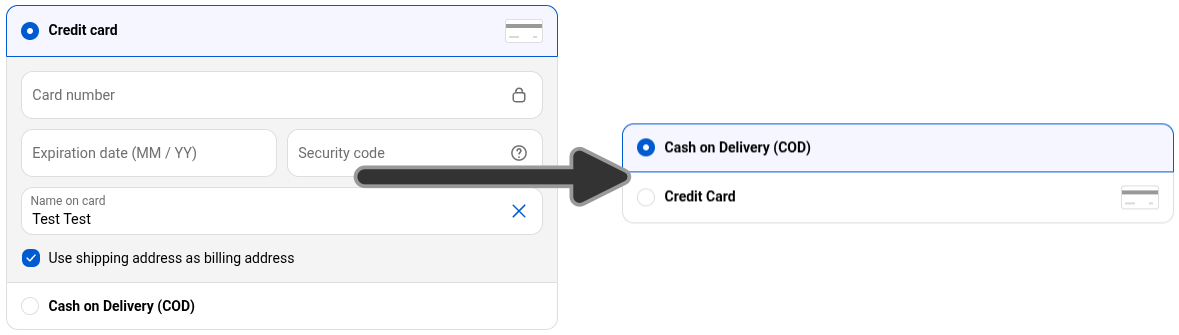
When to use it
Section titled “When to use it”Use a sort operation when you want to:
- prioritize certain payment methods over others
- deprioritize certain payment methods based on customer details
The form
Section titled “The form”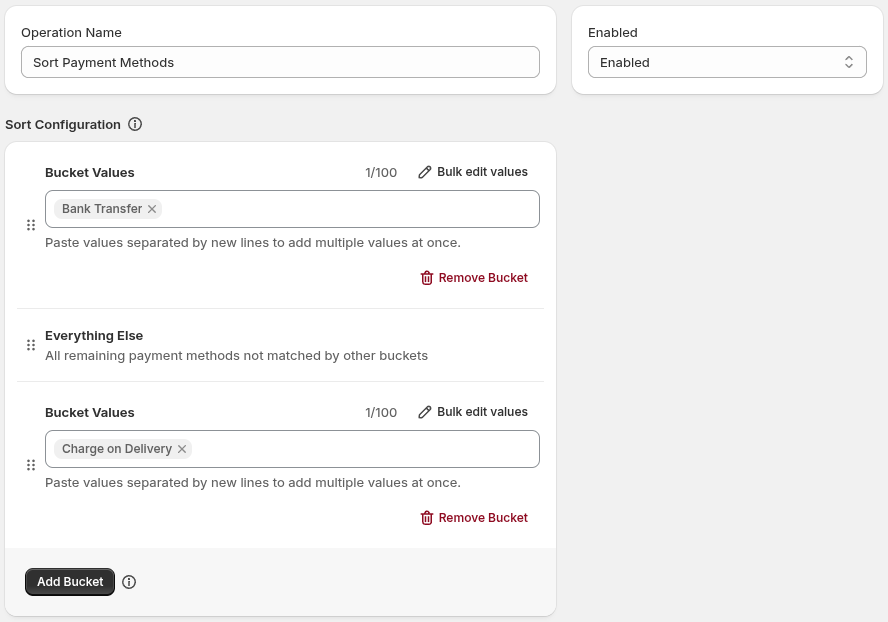
The operation form includes:
- Operation Name: identifies the operation in the app; customers do not see it.
- Enabled Status: controls whether the operation will execute. A disabled operation is saved but does will run.
- Sort Configuration: configure the buckets for the sort. Note: Unlike shipping rate sort operations, there is no “field sort” - only a “custom sort” using buckets is allowed.
- Conditions: control when the operation applies.
Configuring buckets
Section titled “Configuring buckets”Sorting requires configuring buckets of payment methods - methods will be ordered based on the order they appear in the buckets list.
- Under Sort Configuration, select Add Bucket to create a bucket.
- Enter one or more payment method names as values in the bucket. Values in the same bucket of equal priority.
- Drag the buckets to change their top-to-bottom priority.
- Use Everything Else for rates that do not match another bucket. Its position is part of the custom order.
Example
Section titled “Example”To prioritize Bank Transfer, deprioritize PayPal, and leave all other methods between them:
- Sort Type:
Custom Sort - Buckets:
- Bucket 1:
Bank Transfer - Bucket 2:
*(Everything Else) - Bucket 3:
PayPal
- Bucket 1:
See also
Section titled “See also”- Conditions: build optional conditions and combine them with AND logic.
- Condition types: see the condition types available to payment operations.
- Operation didn’t take effect: troubleshoot publishing and matching.